The Complete SEO and AI SEO Course for 2027: From Keyword Research to Content That Gets Found
SEO is not dead. But publishing an article and hoping Google sends traffic is not much of a strategy anymore.
Your content now competes with AI Overviews, ads, videos, forums, social posts, and traditional search results. That makes visibility more competitive, but it also gives you more ways to get discovered.
The goal is simple: create useful content around a specific customer problem, make it easy to understand, and turn it into multiple formats. Build the foundation once, then repeat the process.
That is the approach I use here: choose a niche, validate keywords, build a topical map, write with AI without losing your voice, publish, repurpose, and improve. You do not need a collection of mysterious AI SEO hacks. You need a system you can actually follow.
What You’ll Learn
- Match customer questions, search intent, and business goals before choosing what content to create.
- Build reusable AI workflows around research, templates, brand voice, and firsthand experience.
- Connect commercial pages and supporting articles through a focused topical map and useful internal links.
- Repurpose strong content across platforms and review published pages regularly for accuracy and usefulness.
Table of Contents
- 1. Understand How Google and AI Search Find Content
- 2. Choose a Niche That Connects to a Business
- 3. Build an SEO HQ You Can Reuse
- 4. Match the Article to Search Intent
- 5. Find Keywords Worth Your Time
- 6. Connect Money Pages to a Topical Map
- 7. Pick a Template That Fits the Job
- 8. Write the Full Article With AI Without Making It Generic
- 9. Add Images That Explain Something
- 10. Run the Checklists, Publish, and Refresh
- 11. Turn One Article Into Three to Five More Assets
- 12. Earn Mentions Beyond Your Own Website
- 13. Put the Workflow Into a 90-Day Plan
- Bonus: Build a YouTube Script From Scratch in Poppy
- Build a System, Not a Shortcut
1. Understand How Google and AI Search Find Content
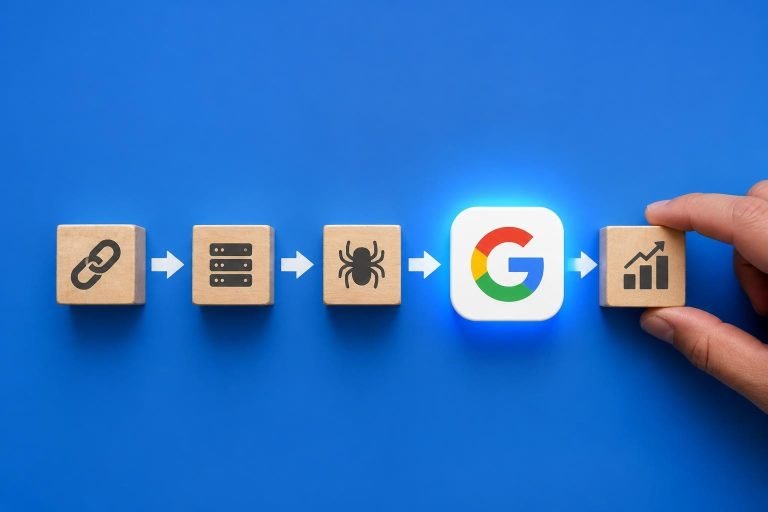
Before worrying about ChatGPT recommendations or AI citations, understand the basic search process. Google’s explanation of how search works breaks it into three main stages:
- Crawling: Automated programs discover pages and download their content, including text, images, and videos.
- Indexing: Google analyzes that information and may store it in its search index.
- Serving results: When someone searches, Google selects relevant results for that query.
Google Search Console helps you check whether pages are indexed and investigate why a page might not be appearing. Publishing alone does not guarantee indexing, and indexing does not guarantee a strong ranking.
Relevance matters. If someone asks how to make coffee at home on a budget, a page about expensive commercial espresso equipment is not necessarily the right answer. Your content needs to address the actual problem behind the search.
The search results page is no longer just blue links
Depending on the query, Google can show:
- AI Overviews and their supporting sources.
- Sponsored placements.
- Traditional website results.
- Forums and discussion threads.
- YouTube, Instagram, TikTok, and other video results.
- A local map pack for location-based searches.
A query such as “how to cut my own hair” can bring together an AI answer, a YouTube tutorial, forum discussions, and blog posts. A commercial query such as “best credit cards for bad credit” can have a very different layout, with substantial advertising competition.
This is why I think about search everywhere optimization, not just search engine optimization. One useful topic can become an article, a video, and several social posts. Each format gives the same expertise another opportunity to be discovered.
How query fan-out changes content planning
AI search can expand one question into several related searches. This is commonly called query fan-out.
For example, a question about fixing a lawn full of weeds might lead to related searches about:
- Suitable lawn herbicides.
- Removing weeds without chemicals.
- Preventing weeds from returning.
The system can then combine information from multiple sources into one answer. Google’s guidance on AI features and websites provides useful context for how its AI search experiences relate to established SEO practices.
Your practical takeaway is not to cram every possible question into one page. It is to answer the related questions that genuinely belong together, using clear headings and useful explanations.
Terms such as GEO, AEO, LLMO, and AI SEO emphasize different parts of this work, but the business objective overlaps: help relevant people and AI systems discover, understand, and reference your brand.
None of this guarantees a number-one ranking or an AI mention. SEO can take months, sometimes much longer. The upside is that a useful page can continue attracting traffic long after the initial work.
Your action: Ask an AI tool what your ideal customer would ask about your product or service, then request related follow-up questions. Treat the output as research ideas, not verified search demand.
2. Choose a Niche That Connects to a Business
A focused website is easier for people to understand. If you publish AI tool reviews on Monday, coffee recipes on Tuesday, and cryptocurrency commentary on Wednesday, what exactly should someone come back for?
Start with one clear audience and one connected group of problems. Google’s people-first content guidance specifically encourages you to consider whether your site has a primary purpose or focus.
This does not mean you can never expand. It means you should establish a useful position before trying to cover everything.
Start with how the content will support revenue
- Affiliate marketing: Choose a subject with products you can genuinely test and recommend.
- Digital products: Create content that naturally leads toward your templates, guides, or courses.
- Services: Answer the questions people ask before hiring someone with your expertise.
- An existing business: Write for the customers you already serve and the problems your offer solves.
Traffic is useful when it connects to a business outcome. A smaller audience with a relevant problem can be more valuable than a large audience that will never need your offer.
Go one or two levels narrower
“AI” is broad. “AI video editing” is more specific. “Editing videos with ChatGPT” gives you a clearer problem to solve. “AI video repurposing for coaches” adds a defined customer.
The same principle works outside technology:
- Sports.
- Pickleball.
- Pickleball injuries.
- Pickleball paddles for players with tennis elbow.
The last topic connects an audience, a problem, and a product category. That gives you a much more practical starting point for content planning.
ChatCut provides a useful example of focused positioning. Its tutorials connect AI-assisted video editing questions to its product. In the demonstrated searches, its content appeared across AI Overviews, video results, and traditional results. The lesson is the connected strategy, not an assumption that any ranking will remain fixed.
Other examples follow the same pattern: CreativeClaw connects AI video and voice-over education to its offering, while pickleball-related articles connect equipment questions to relevant products or appointment-based services.
A four-prompt process for finding your niche
You can do this manually or use an AI tool to help you think.
- Generate options. Explain your skills, interests, and business model. Ask for five niche ideas that connect them.
- Narrow the strongest option. Ask for three increasingly specific versions, the audience for each, and three questions that audience might search.
- Stress-test the opportunity. Check those questions on Google and in AI search. Look for smaller sites, missing explanations, and weak firsthand testing.
- Write your positioning. Ask for a clear statement describing whom you help, what you help them accomplish, your angle, and four connected content topics.
For example, interests in AI, video, coaching, and editing could lead toward helping business coaches turn recorded calls and webinars into professional LinkedIn clips.
Do not accept an AI-generated opportunity assessment without checking it. Search the suggested questions yourself. See which formats appear, who gets cited, and whether you can contribute something better.
Your action: Finish this sentence: “I help [specific audience] do [specific outcome].” If that sentence is clear, your content decisions get much easier.
3. Build an SEO HQ You Can Reuse
The biggest advantage of an organized AI workflow is not generating one article quickly. It is avoiding the same setup work every time you write.
I use Poppy AI as a visual workspace for sources, templates, notes, and connected chats. You can use another tool, but keep the underlying structure.
The SEO HQ board and writing templates bring this workflow together and are available to use with Poppy AI.
Organize your workspace around these ten steps:
- Niche and writing style.
- Content planning and keywords.
- Competitor research.
- Article template selection.
- Rough outline and personal notes.
- Article drafting.
- Blog images.
- Blog post and AI search checks.
- Publishing.
- Repurposing.
Add a “Start Here” note with the sequence and your reusable prompts. The demonstrated board uses grouped resources and separate chats so each stage has the information it needs.
Create your writing style once
AI needs examples if you want something more personal than a generic article. Useful source material includes:
- Articles you have written.
- Your YouTube or Loom videos.
- Voice memos.
- Recorded explanations or meetings.
- Existing brand documents.
There are two practical approaches in Poppy.
Use the brand voice feature: Add your website, social content, or other existing material, then review the generated profile. Check the audience, messaging, tone, speaking style, offer, and content pillars.
Create a manual style guide: Add your source material to a board and ask AI to analyze your wording, sentence structure, explanations, and recurring language. Save the result as a reusable text document.
Either way, edit the profile. AI can identify patterns, but you decide whether those patterns represent how you want to communicate.
Keep each chat focused
Do not connect your entire resource library to every conversation. Connected context can increase usage and make a simple task unnecessarily heavy.
For competitor analysis, connect the competitor sources. For drafting, connect the relevant research, selected template, outline, and brand voice. Disconnect or replace material from an earlier article before starting the next one.
Poppy Co-pilot can help explain or organize a board. That is useful for orientation, but a focused writing chat is still the cleaner place to produce the article.
Your action: Set up your workspace and save one approved writing style guide before creating your first draft.
4. Match the Article to Search Intent
Search intent is the reason behind the query. If you get that wrong, a polished article can still be the wrong answer.
Use four simple categories:
- Learning: The person wants an explanation or instructions. Use a how-to guide or pillar article.
- Comparing: The person is weighing options. Use a comparison article.
- Buying or evaluating a purchase: The person wants recommendations or a product assessment. Use a roundup or review.
- Branded or navigational: The person wants a particular company’s login, pricing page, or website.
“How to connect apps to an AI assistant” calls for instructions. “Assistant A versus ChatGPT” calls for a comparison. “Best AI assistants for creators” calls for a product roundup.
A branded login query usually is not a sensible target for an affiliate publisher because the searcher is trying to reach the product itself. A pricing query needs closer inspection because its intent can differ.
Run the Google test
- Search the exact topic, preferably in a signed-out or private browsing session.
- Inspect the leading results and the formats Google shows.
- Review related questions, video results, and any AI citations.
- Decide which format would best satisfy the search.
Private browsing reduces some personalization, but it does not make results universal. Treat this as a useful research snapshot.
Also consider conversational wording. Someone might type a short keyword into Google but ask an AI assistant a longer question about connecting Google Drive and Notion so it can read their files. Those specific questions can become useful headings when they fit the article.
Your action: Choose one keyword, identify its intent, and select the matching article format before writing.
5. Find Keywords Worth Your Time
I want three “yes” answers before committing to a topic:
- Is there evidence of demand? Are people looking for this information?
- Does it fit the business? Can the content support a relevant product, service, lead, or customer journey?
- Can I realistically compete? Is there room to contribute something useful alongside the existing results?
A keyword can have substantial volume and still be a poor choice. If the results are dominated by established publishers with deep expertise and strong coverage, look for a more specific angle rather than assuming you can compete immediately.
Understand volume and difficulty
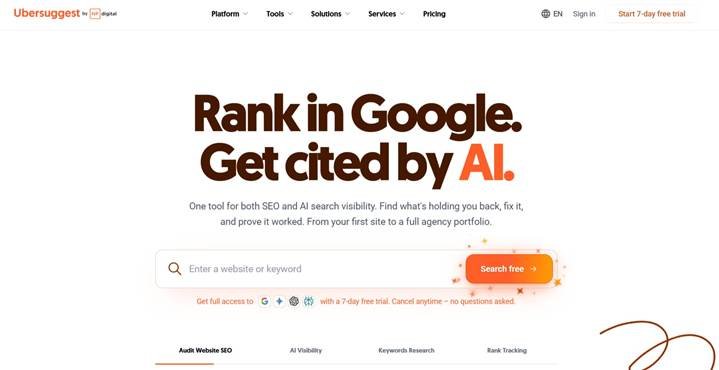
Keyword tools such as Ubersuggest provide estimates of monthly search volume and ranking difficulty. These are planning inputs, not promises.
Volume estimates help you assess demand. Difficulty estimates help you screen potential competition. Neither replaces looking at the results yourself.
Zero reported searches does not always mean zero demand
New topics are where keyword tools can be especially misleading. A recently launched product or feature may already be attracting attention while a tool still shows older data or no measurable volume.
In the connector example used throughout the workflow, Ubersuggest showed little or no demand for some terms while other signals suggested growing interest.
Cross-check emerging topics with:
- Google Trends for changes in relative search interest.
- Google Keyword Planner for additional demand estimates and related ideas.
- Google autocomplete and related questions.
- Current search results and relevant video activity.
- Tools such as Glimpse for additional trend context.
Be careful with the metrics. Google Trends shows relative interest rather than an exact count of searches. Keyword Planner’s competition field concerns advertisers, not organic ranking difficulty.
Group related keywords into one useful article
Do not create a separate page for every slight wording variation.
Terms such as “connectors,” “integrations,” “how to connect apps,” and “connector list” may belong together if the results show the same underlying need. A single setup guide can cover those angles naturally.
Different needs can justify separate pages:
- What the product is.
- How to set up its connectors.
- A comparison with another assistant.
- A product review.
- Alternatives for a particular audience.
Ask AI to suggest keyword clusters and explain the intent behind each proposed page. Then review the clusters manually. The goal is to avoid multiple articles competing to answer essentially the same question.
Your action: Find ten keyword ideas, group overlapping terms, and choose one page to create first.
6. Connect Money Pages to a Topical Map
Some pages help people learn. Others help them decide what to buy. A useful content strategy connects both.
A money page is a page closely connected to revenue, such as a relevant product roundup, review, or service page. Supporting pages answer the questions people have before reaching that decision.
Think of it as a hub and spokes.
For a hub about the best AI assistants for creators, supporting content might include:
- How to connect apps to one of those assistants.
- A guide to useful connectors.
- A detailed review.
- A comparison with ChatGPT.
The reader’s journey often moves from curiosity to comparison to a purchase decision. Your internal links should make the next relevant step easy without forcing everyone down the same path.
Turn the map into a calendar
Start with the commercial page so your supporting content has somewhere useful to lead. Then schedule three to five related articles in a 30-day calendar using Notion, Trello, or whichever planning tool you prefer.
Link supporting articles to the hub where it makes sense. Link the hub back to deeper explanations when they help someone make a decision. Google’s link guidance explains how links support discovery and provide context.
Also consider the next step on the page itself. A recommendation, relevant review link, service inquiry, or product button should fit the content. Sticky sidebars and banners are options, not requirements. If a recommendation uses an affiliate link, disclose that clearly.
Your action: Draw one money page with three to five supporting pages and put them into your calendar.
7. Pick a Template That Fits the Job
A template gives AI structure. It does not replace research or turn every topic into the same article.
Keep five core formats available:
- How-to guide: A clear result, necessary context, and practical steps.
- Comparison: The meaningful differences between options and who each suits.
- Pillar post: A broader guide that organizes a connected subject.
- Product roundup: Several recommendations for a defined audience or problem.
- Product review: A focused evaluation of one product.
A roundup template can include an H1, quick recommendations, individual product sections, features, pricing, pros and cons, and relevant questions. A how-to template should prioritize the process rather than burying it beneath a long introduction.
Save strong reference articles alongside your templates. Look for clear titles, short paragraphs, relevant internal links, helpful visuals, and concise answers near the beginning.
For example, the demonstrated Castmagic article gets into its instructions quickly. The vidIQ example combines scannable content with a short summary and relevant product pathways. Model the useful structure, not someone else’s wording.
Your action: Choose one template that matches the intent of your selected keyword.
8. Write the Full Article With AI Without Making It Generic
The writing process has five moves: confirm intent, find the gap, choose the template, add your experience, and draft.
I use Claude models within Poppy for this workflow. The exact model matters less than the quality of the material you provide and the review you do afterward.
Step 1: Collect three to five relevant competing pages
Search your main keyword and a close variation. Add the most relevant pages to a competitor research group. Include official documentation when it helps verify the topic, even if your main focus is competing articles.
Ask AI to extract:
- The heading structure from H1 through H4.
- Related terms and recurring concepts.
- Subtopics covered.
- Questions answered.
- Products or services mentioned.
- What the pages explain poorly or leave unanswered.
Use a less resource-intensive model for straightforward extraction if appropriate. Save stronger reasoning models for work that benefits from them.
Remember what this analysis can and cannot do. It reveals patterns among ranking pages. It does not prove that every shared feature caused those pages to rank.
Step 2: Create a focused article brief
Save the research with a short note specifying the main keyword, search intent, audience, and article type.
Then connect that brief to the chosen template and request an outline. A useful instruction is:
Create an informational how-to outline using the connected research and template. Answer the main question early, include relevant related questions, and flag anything that needs verification.
For the connector guide, the outline included a definition, connector categories, a setup process, permissions, alternative connection methods, and ongoing account cleanup.
That is the value of research plus structure: the outline becomes more complete than a generic request to “write an SEO article.”
Step 3: Add your experience before drafting
This is the part you should not skip.
Paste the outline into a rough-outline group, then add your own notes under the relevant sections. Include what you tried, what worked, where you got stuck, and what you would do differently.
Add existing videos, demonstrations, Loom recordings, or other original material. This gives AI actual experience to work with instead of inviting it to invent personal claims.
Step 4: Generate the rough draft
Connect the approved outline, relevant research, template, personal notes, and brand voice. Ask AI to follow the structure and use only supported information.
The demonstrated article targeted roughly 2,000 to 2,500 words and produced a draft of about 2,400 words. That was a project-specific target, not a universal SEO requirement. Let the topic determine the length.
Step 5: Edit like the author
Read the whole draft. Check the facts, not just the flow.
- Remove claims you cannot support.
- Verify setup instructions against the actual product.
- Correct anything that misrepresents your experience.
- Replace stiff headings with natural wording.
- Reduce unnecessary bold text and repetition.
- Add useful examples and genuine screenshots.
- Cut anything you would never say.
You can ask AI to revise individual problems conversationally. For example, request a more natural heading without changing the section’s meaning, or ask it to remove excessive formatting.
Finish with a short answer near the top, clear headings throughout, and relevant FAQs where they add value. These make the page easier to understand, but they do not guarantee an AI citation.
Your action: Complete your rough outline, add firsthand notes, and produce one reviewed draft.
9. Add Images That Explain Something
Three image types are useful for many articles, especially software tutorials:
- Featured image: A visual introduction to the topic.
- Explainer or diagram: A way to simplify a workflow, relationship, or comparison.
- Screenshot: Evidence of the actual interface, settings, process, or result.
Create a consistent featured image
Add an existing image as a style reference, along with relevant brand assets. Specify the aspect ratio, main text, and desired layout.
For example, you might request a 16:9 image that follows your existing visual style and communicates the article’s main task.
Review the result closely. In the demonstration, the first image needed spacing improvements. Changing the dark background to white with a subtle grid produced a cleaner option.
Small edits can make a big difference. Do not settle for the first generation just because it exists.
Use AI for diagrams, not fake proof
Provide a design reference and explain the exact relationship the diagram should communicate. Keep relevant logos and brand references attached if you want consistent output.
The generated connector diagram placed the assistant in the center with connected apps around it. That is a useful visual pattern, but any labels, capabilities, and connection claims still need checking.
Use real screenshots for actual product evidence. A generated illustration is not proof that a setting, integration, or result exists.
Prepare the images for publishing
Compress large files, add descriptive alt text, and place each image beside the explanation it supports. Tools such as Awesome Screenshot can capture the visible interface and blur private information.
Keeping the draft and images together in Notion or Google Docs makes the handoff to your CMS simpler.
Your action: Create a featured image, one useful diagram, and one genuine screenshot for your draft where those visuals support the topic.
10. Run the Checklists, Publish, and Refresh
AI can help audit a draft, but you still need to review the finished page. A good draft can lose useful formatting, links, or images during publishing.
The blog post checklist
- One clear H1 and a logical heading hierarchy.
- A relevant title, readable URL, and meta description.
- Short paragraphs and scannable sections.
- Useful internal links.
- Appropriate images with descriptive alt text.
- A relevant video embed when it helps explain the topic.
- A sensible next step, with affiliate disclosures where needed.
The AI search clarity checklist
- A direct answer near the beginning.
- Coverage of the important related questions.
- A clear recommendation or conclusion when the topic calls for one.
- Firsthand experience and verifiable supporting material.
- Relevant FAQs rather than filler questions.
- A visible author and an accurate updated date.
These are clarity and quality checks, not a formula that forces an AI system to select your content.
Move the draft into your CMS
The demonstrated workflow moves the Poppy draft into Notion, then uses Claude with connected tools and browser control to create a draft in Ghost. It transfers the content, images, video, and internal links.
You can also do the transfer manually. Automation is useful for repetitive publishing work, but inspect the preview before publishing. Check links, spacing, media, metadata, and any content the automation added.
Schedule a quarterly review
Every three months is a practical review cadence for this workflow. Use Search Console to identify declining pages and content sitting around page two or three.
Recheck the topic, then update what actually needs attention:
- Outdated screenshots or setup steps.
- Changed pricing and features.
- Missing explanations.
- Weak internal links.
- Recommendations that no longer fit.
You can use scheduled AI tasks and connected resources to prepare updates. Keep human review before republishing. The purpose is accuracy and usefulness, not changing a date to make an unchanged article look fresh.
Your action: Run both checklists, preview the page, and publish it or leave it as an approved draft with a clear review date.
11. Turn One Article Into Three to Five More Assets
Publishing should not be the end of the process. You already did the research. Use it again.
One article can support:
- A YouTube tutorial.
- A LinkedIn post.
- An X post or thread.
- A short-form video or carousel.
- A newsletter.
The goal is not to paste the exact same article everywhere. Adapt the same useful idea to the format people expect on each platform.
Repurpose the article into a video
- Add the finished article to a dedicated repurposing group.
- Add relevant script frameworks and strong format references.
- Connect your brand voice.
- Ask for a script that preserves the article’s facts while adapting the hook, pacing, and explanations.
- Review it for accuracy and natural delivery.
You can use Poppy Co-pilot to help collect scripting references and organize them into a group. Study patterns such as how a hook introduces the problem or how a tutorial moves between explanation and demonstration. Do not copy another creator’s content.
If you prefer teaching from slides, turn the script into a presentation with large title cards, simple explanations, and cues for screen sharing. Add your visual design references if you want a consistent style.
Repurpose it into a carousel
Connect the article to a carousel template and relevant examples. Ask for a slide sequence built around one clear lesson or process.
Generate the first slide, review the style, then approve the remaining slides. That approval step helps avoid producing an entire set in the wrong direction.
The connector example used a five-step setup sequence with consistent characters and short explanations. Because the original article included personal experience, the carousel could also reference a specific custom connector example.
This is why the original inputs matter so much. Better source material improves every asset you create from it.
Your action: Turn your article into one video script and at least two additional platform-specific assets.
12. Earn Mentions Beyond Your Own Website
Your own publishing is only part of the visibility picture. Relevant appearances in other people’s content give people additional ways to discover your expertise.
Practical opportunities include:
- Being included in a relevant product roundup.
- Contributing genuinely useful answers in communities such as Reddit.
- Appearing on a podcast or collaborating on a video.
- Answering journalists’ requests for expert commentary.
- Creating a useful free tool that people want to reference.
A backlink is a link from another website to yours. Links help search engines discover pages and understand relationships between content.
Keep the objective grounded: earn relevant coverage by contributing something useful. More mentions are not automatically better, and a mention does not guarantee a ChatGPT recommendation.
Likewise, treat third-party “domain authority” scores as tool-specific indicators, not a Google score you can directly increase with a checklist.
Your action: Pursue one relevant collaboration, expert contribution, or earned mention this month.
13. Put the Workflow Into a 90-Day Plan
Do not try to build a huge content operation before publishing your first useful page. Start with one connected topic and improve the process as you go.
Days 1 to 30: Build the foundation
- Define your niche in one sentence.
- Set up the SEO HQ workspace and writing style.
- Research and cluster your first keywords.
- Choose one money page and its supporting topics.
- Draft and publish the first pages using the matching templates.
Days 31 to 60: Expand the topic and distribution
- Continue publishing the supporting articles.
- Add useful internal links between related pages.
- Repurpose articles into video and social formats.
- Start pursuing relevant mentions and collaborations.
Days 61 to 90: Review and improve
- Review indexing, search performance, and relevant AI search appearances.
- Identify pages with weak coverage or outdated information.
- Improve promising pages rather than only creating new ones.
- Schedule the next quarterly review.
Keep a simple record of what you published, which questions you checked in AI search, and which sources appeared. Use that record to notice changes without treating one generated answer as a permanent ranking.
Your action: Put the work into your calendar. A realistic plan you follow is more useful than an ambitious plan you abandon.
Bonus: Build a YouTube Script From Scratch in Poppy
You do not need a finished article to use this system. You can start with a video idea, create a script, and repurpose the finished material afterward.
In Poppy, open the YouTube scripting template and use the guided tour. The setup focuses on three inputs: your speaking style, inspiration, and business goals.
1. Add your speaking style
Use an existing video if you have one. If you are starting from scratch, choose an appropriate preset, such as educational, storytelling, motivational, or a direct, no-fluff style.
Educational content benefits from clear explanations. Story-led content needs scenes, tension, and a meaningful takeaway. Choose the approach that fits the content rather than the one that sounds most impressive.
2. Add relevant inspiration
Add a channel or videos with useful structure and relevant audience appeal. Poppy can organize recent, popular, and unusually strong-performing examples.
Keep the roles separate: your material defines the voice, while the references help with structure and presentation.
3. Explain your goals and offer
Tell the system:
- What you help people do.
- What you sell or recommend.
- Who the ideal customer is.
- What makes your approach different.
- What action the content should support.
You can provide this through text or a guided conversation. Specific inputs produce a more relevant script than a vague request for something “viral.”
4. Generate titles, then choose one
Ask for five title options using the connected goals, references, and frameworks. Pick the title that best fits the actual lesson you can deliver.
The demonstration explored a title about making a first sale with AI and YouTube in 90 days. That is an example of packaging an idea, not evidence that a sale within that timeframe is guaranteed.
5. Generate and refine the script
Request a conversational script for the intended audience using your speaking style and selected framework. Add your preferences, including words, formatting, or punctuation you want to avoid.
A complete draft can include:
- An opening hook.
- A relevant credibility section.
- Organized teaching sections.
- Transitions and delivery notes.
- B-roll and text-overlay ideas.
- Pacing guidance.
Check personal claims carefully. A generated credibility section should never invent your results, experience, or customer outcomes.
6. Turn the script into a carousel or presentation
Once approved, use the script to create a slide deck or carousel. Review the first generated slide, approve the direction, and download the finished assets.
You can then adapt the images for LinkedIn, Instagram, or YouTube community posts. Add a platform-appropriate opening, check the text and brand colors, and schedule the finished post.
The useful pattern stays the same: your knowledge, organized references, a suitable framework, AI assistance, and human review.
Build a System, Not a Shortcut
Traditional SEO and AI search optimization share a substantial foundation: discoverable pages, relevant answers, clear organization, useful links, and credible information.
Start with a specific customer. Choose a topic worth answering. Match the intent. Add your experience. Publish something useful, then adapt it for the places your customers search.
AI can handle a lot of the organizing, drafting, formatting, and repurposing. Your job is to make sure the result is accurate, relevant, and genuinely worth finding.